Python Programming Language: An Introduction
Guido van Rossum started working on Python in December 1989 at CWI, a research institute in the Netherlands, and released the first version in February 1991. He wanted a language that was easy to read, quick to write and powerful enough for real work.
Years later, in his 1999 proposal Computer Programming for Everybody, he set out a plan built around Python. One of its stated aims was to:
"Create better, easier to use tools for program development and analysis."
That aim still describes Python well. Its clean syntax and large standard library let people go from an idea to a working program quickly, which is a big part of why it is one of the top ten most used computer languages in the world.
The Python Software Foundation looks after the language today. It holds the rights to Python and supports the community that develops it.
Programming paradigms supported by Python
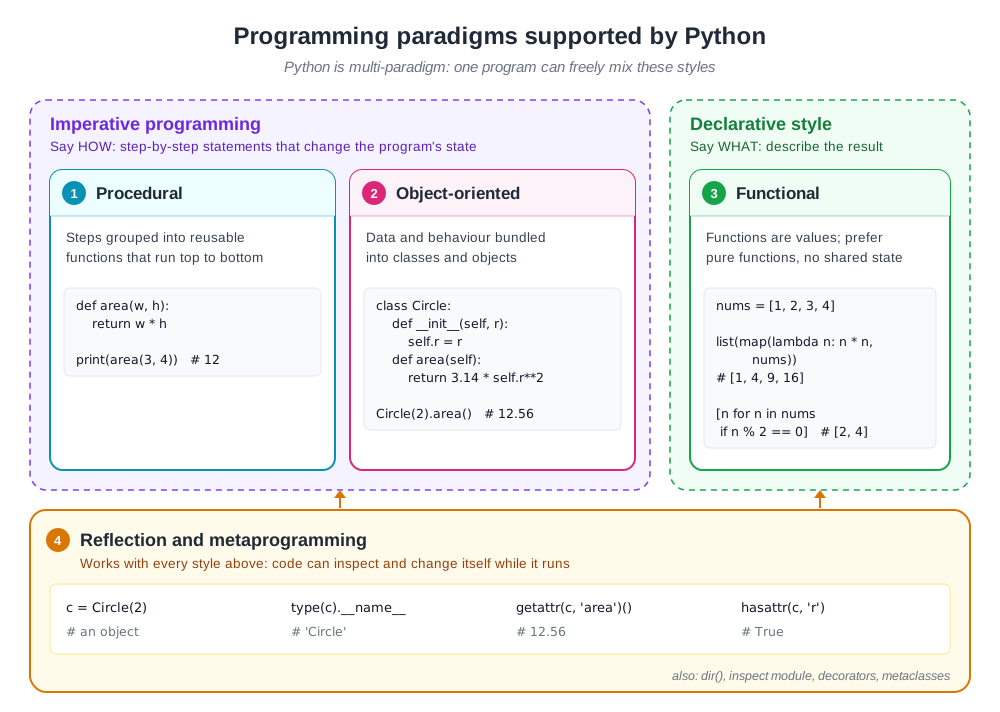
Python is a multi-paradigm language. A single program can freely mix several styles of programming:
- Procedural programming: the program is a sequence of steps, grouped into reusable functions.
- Object-oriented programming: data and the code that works on it are bundled together into classes and objects.
- Functional programming: functions are values that can be passed around, and results are built by combining functions such as
map()andfilter(), or with comprehensions.
Procedural and object-oriented programming are both imperative styles: the code says how to reach a result, step by step. Functional programming leans towards a declarative style: the code describes what result is wanted.
Underneath all of these, Python supports reflection. A program can look at its own objects while it runs, for example to find an object's type or call a method by its name.
A Hello World program in Python
Python programs are run by the Python interpreter. Typing python (or python3 on many systems) in a terminal starts the interpreter as an interactive console, where each statement runs as soon as you press Enter:
$ python3
Python 3.13.18 (main, Oct 26 2026, 14:08:19) [Clang 23.1.3 ] on linux
Type "help", "copyright", "credits" or "license" for more information.
>>> print('Hello World')
Hello World
>>>
Statements typed into the interactive console are lost when the session ends. To keep a program and run it again, save it in a file with the .py extension. Open your favorite text editor, type the line below, and save the file as HelloWorld.py:
print('Hello World')Then run the file with the interpreter:
$ python3 HelloWorld.py
Hello World
Entry point of a Python program
Languages such as C, C++ and Java start running a program from a special main() function. Python has no such requirement. When you run a file, Python simply executes its top-level statements from top to bottom.
Every Python file is a module, and each module has a built-in variable called __name__:
- When the file is run directly,
__name__is set to"__main__". - When the file is imported by another file,
__name__is set to the module's name.
This lets a file contain code that runs only when it is executed directly, which is the closest thing Python has to a main() function. Save the following as greet.py:
def greet(name):
    return f"Hello, {name}!"

print("__name__ in greet.py is:", __name__)

if __name__ == "__main__":
    print(greet("World"))
Running it directly:
$ python3 greet.py
__name__ in greet.py is: __main__
Hello, World!
Now import it from another file, app.py:
import greet

print(greet.greet("Python"))$ python3 app.py
__name__ in greet.py is: greet
Hello, Python!When greet.py is imported, __name__ is "greet", so the code inside the if __name__ == "__main__": block is skipped.
The Python interpreter and Python byte code
A Python program is not translated directly into machine code, as a C or C++ program is. Instead, the interpreter first compiles the source code into byte code, a lower-level set of instructions, and then runs that byte code on the Python virtual machine.
Python handles byte code differently from Java:
- Java compiles programs into
.classfiles ahead of time, as a separate step. - Python compiles automatically every time a program runs. The byte code for the file you run directly is kept in memory and is not saved to disk.
- For each module the program imports, Python saves the byte code as a
.pycfile inside a__pycache__folder, so the next run can skip recompiling it. After runningapp.pyabove, the folder containsgreet.cpython-313.pyc. Thecpython-313part names the interpreter and its version.
To create a .pyc file for any Python file yourself, use the py_compile module:
import py_compile

pyc_path = py_compile.compile("HelloWorld.py")
print("Byte code written to:", pyc_path)Byte code written to: __pycache__/HelloWorld.cpython-313.pycTo compile all the files in a folder at once, use the compileall module.
Neither Python source code nor its byte code runs directly on a computer's processor. A Python program always runs through a Python interpreter.
Python interpreters: a few implementation details
The standard Python interpreter is written in C and is known as CPython. It is the version you download from python.org. Python has also been implemented in other languages:
| Interpreter | Written in / runs on |
|---|---|
| Jython | Java (runs on the Java Virtual Machine) |
| IronPython | C# (runs on .NET) |
| PyPy | RPython, with a just-in-time compiler for speed |
| MicroPython | C, for microcontrollers and small devices |
Applications of the Python programming language
Python is a high-level, general-purpose language. It is widely used for:
- Artificial intelligence and machine learning: PyTorch, TensorFlow and scikit-learn
- Data analysis and visualization: pandas, NumPy and Matplotlib
- Scientific computing: SciPy and Jupyter notebooks
- Web development: Django, Flask and FastAPI
- Automation and scripting: everyday tasks, system administration and testing
- Text processing: from simple string handling to natural language processing
- Education: its readable syntax makes it a common first programming language
and much more.
The current version of Python is Python 3.15. Its latest release, Python 3.15.2, came out on October 25, 2026. The examples in this article were run with Python 3.13.18, and they work the same way in Python 3.15.
References
- Guido van Rossum, Computer Programming for Everybody (1999): https://www.python.org/doc/essays/cp4e/
- Python downloads and active releases: https://www.python.org/downloads/