Converting Text into Vectors for Cosine Similarity in Python: Why the Order of Numbers Matters
- Last updated: November 20, 2026
- Tested with: Python 3.13.18, NumPy 2.5.3, SciPy 1.18.1, scikit-learn 1.9.1
Overview
Cosine similarity compares two vectors. But real data rarely arrives as neat vectors. It comes as pages of text, dictionaries, JSON records or lists of tags. Before you can compare them, you have to turn them into vectors correctly.
This article covers two closely related questions:
- Why does the order of numbers in a vector matter, and what goes wrong when it is mixed up?
- How do you convert two pages of text into vectors that can be compared with cosine similarity?
The two answers meet in one idea: every position in a vector must mean the same thing in both vectors. Building a text vector is largely about making that true.
A vector is an ordered list
A vector is an ordered list of numbers, where each position stands for one feature. For example, if the positions mean the words python, scipy, cricket and match:
a = [3, 2, 0, 1] # python: 3, scipy: 2, cricket: 0, match: 1The numbers on their own mean nothing. 3 only means "the word python appears 3 times" because it sits in position 1, and position 1 has been agreed to mean python.
Cosine similarity uses the dot product, which multiplies the numbers in matching positions and adds them up:
a · b = a₁b₁ + a₂b₂ + … + aₙbₙSo position 1 of one vector is always compared with position 1 of the other. If those positions don't mean the same thing, the comparison is meaningless.
What happens when the order is changed?
There are four situations to understand.
Case 1: Both vectors are reordered the same way – no change
If you shuffle the positions of both vectors in exactly the same way, the cosine similarity does not change. The dot product and the lengths only depend on which numbers are paired up, not on where the pairs sit.
Case 2: The vectors are reordered differently – wrong answer
If one vector is shuffled and the other is not, or each is shuffled differently, the wrong features get compared. Python in one document is matched with match in the other. SciPy still returns a number, with no error or warning, so this is a silent bug.
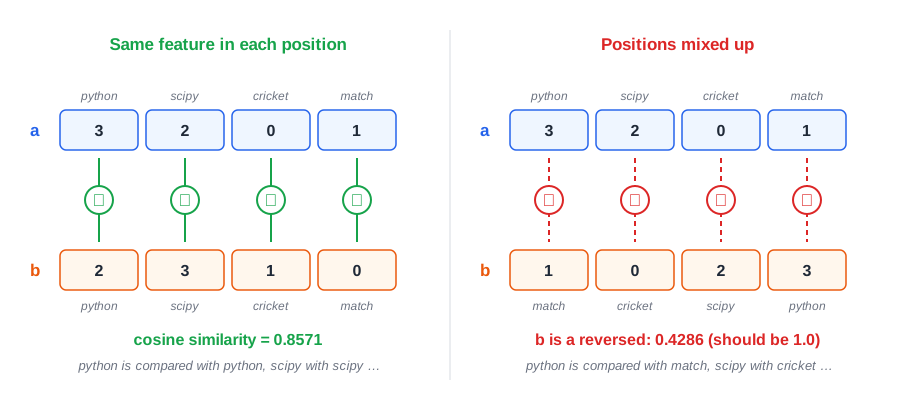
Figure 1: Left – each position means the same word in both vectors. Right – b holds exactly the same numbers as a, but in reverse order, so python is compared with match. The similarity drops from 1.0 to 0.4286.
Case 3: The data has no natural order
Some data is just a collection of items with no order, such as the tags on a blog post or the products in a shopping basket. It is not a vector yet. You have two options:
- Fix an order with a shared vocabulary. List every possible item once, in a fixed order, and record a count or a 0/1 flag for each. Each collection becomes a vector in that order.
- Use a set-based measure such as Jaccard or Dice dissimilarity, which are designed for presence or absence of items.
Case 4: Only the values matter, not which feature they belong to
Sometimes you want to compare the spread of values, for example two lists of exam marks, where student order is irrelevant. Then position-by-position comparison is the wrong tool. Sort the values, compare histograms, or use a distribution measure such as scipy.stats.wasserstein_distance, which does not depend on order.
Converting two pages of text into vectors
A computer cannot compare text directly. To compare two pages, each page is turned into a vector of numbers in the same fixed order. We'll use two short "pages" as the running example:
- Page 1: "Python is a popular language. SciPy is a Python library for science."
- Page 2: "SciPy helps scientists. Many scientists use Python and SciPy daily."
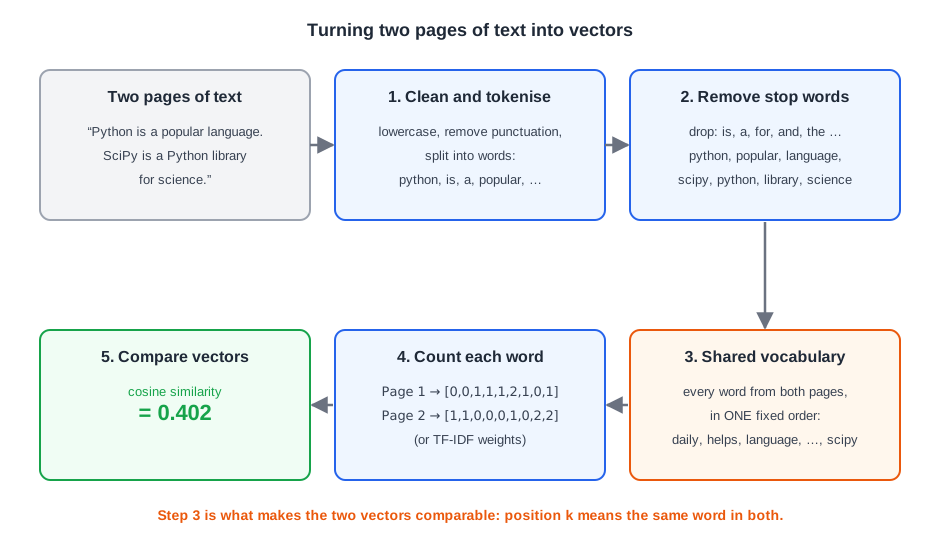
Figure 2: The steps from text to vectors. Step 3, the shared vocabulary, is what guarantees that position k means the same word in both vectors.
Method 1: Bag of words (word counts)
Step 1 – Clean and tokenise. Convert the text to lowercase, remove punctuation and split it into words (called tokens).
Step 2 – Remove stop words. Drop common words that carry little meaning, such as is, a, for, and, the.
| Page | Tokens left |
|---|---|
| Page 1 | python, popular, language, scipy, python, library, science |
| Page 2 | scipy, helps, scientists, scientists, python, scipy, daily |
Step 3 – Build a shared vocabulary. Collect every distinct word from both pages and put them in one fixed order. Sorting alphabetically is a simple way to do this:
[daily, helps, language, library, popular, python, science, scientists, scipy]This is the step that connects text vectors to the order problem above. Because both pages use the same vocabulary list, position 6 means python in both vectors.
Step 4 – Count each word.
| Word | daily | helps | language | library | popular | python | science | scientists | scipy |
|---|---|---|---|---|---|---|---|---|---|
| Page 1 | 0 | 0 | 1 | 1 | 1 | 2 | 1 | 0 | 1 |
| Page 2 | 1 | 1 | 0 | 0 | 0 | 1 | 0 | 2 | 2 |
Each page is now a 9-dimensional vector:
Page 1 → [0, 0, 1, 1, 1, 2, 1, 0, 1]
Page 2 → [1, 1, 0, 0, 0, 1, 0, 2, 2]
Step 5 – Compare. The cosine similarity of these two vectors is 0.402 (Example 5 below). The pages share python and scipy but differ on everything else.
Method 2: TF-IDF (weighted word counts)
Plain counts treat every word equally. TF-IDF (term frequency – inverse document frequency) gives more weight to words that are frequent on one page but rare across all pages, and less weight to words that appear everywhere.
In our example, python and scipy appear on both pages, so TF-IDF gives them less weight than distinctive words such as scientists or library. The similarity drops to 0.2567 (Example 6), because the shared words now count for less.
Method 3: Embeddings (meaning, not just words)
Notice that science and scientists were treated as completely different words in both methods. There are two ways to improve this:
- Stemming or lemmatisation reduces words to a common root form before counting, so related forms are counted together. Libraries such as NLTK and spaCy provide this.
- Embeddings go much further. A trained AI model turns a whole page into a vector of a few hundred numbers that captures meaning. Pages that say the same thing in different words get vectors pointing in a similar direction. Embeddings are how modern semantic search and AI assistants compare text, and they are almost always compared using cosine similarity.
With embeddings, the model fixes the meaning of each position, so the order rule still holds: always compare vectors produced by the same model.
Comparing the three methods
| Method | What the vector contains | Strengths | Weaknesses |
|---|---|---|---|
| Bag of words | Word counts | Simple and easy to explain | Common words dominate; no sense of meaning |
| TF-IDF | Weighted word counts | Highlights distinctive words | Still matches exact words only |
| Embeddings | Numbers produced by an AI model | Captures meaning and synonyms | Needs a model; harder to interpret |
Python examples
All examples were tested with Python 3.13.18, NumPy 2.5.3, SciPy 1.18.1 and scikit-learn 1.9.1.
Example 1: Reordering both vectors the same way
from scipy.spatial import distance

# Word counts in the order: python, scipy, cricket, match
a = [3, 2, 0, 1]
b = [2, 3, 1, 0]
print("Original order:      ", round(1 - distance.cosine(a, b), 4))

# Reorder BOTH vectors the same way: scipy, cricket, python, match
order = [1, 2, 0, 3]
a2 = [a[i] for i in order]
b2 = [b[i] for i in order]
print("Reordered a:", a2, " Reordered b:", b2)
print("Same reordering:     ", round(1 - distance.cosine(a2, b2), 4))
Output:
Original order:       0.8571
Reordered a: [2, 0, 3, 1]  Reordered b: [3, 1, 2, 0]
Same reordering:      0.8571
Example 2: Mismatched order gives a wrong answer
from scipy.spatial import distance

a = [3, 2, 0, 1]          # python, scipy, cricket, match
a_reversed = [1, 0, 2, 3] # the same numbers in reverse order

print("a vs a:          ", round(1 - distance.cosine(a, a), 4))
print("a vs a reversed: ", round(1 - distance.cosine(a, a_reversed), 4))
Output:
a vs a:           1.0
a vs a reversed:  0.4286
The two vectors contain exactly the same numbers, yet the similarity falls from 1.0 to 0.4286, and SciPy gives no warning.
Example 3: Building vectors from dictionaries
Data from JSON, APIs or database rows often arrives as dictionaries, and the keys may come in any order. Use one explicit, shared list of features.
from scipy.spatial import distance

# Keys arrive in a different order in each dictionary
doc1 = {"scipy": 2, "python": 3, "match": 1}
doc2 = {"cricket": 1, "python": 2, "scipy": 3}

# One explicit, shared list of features fixes the order
features = ["python", "scipy", "cricket", "match"]
v1 = [doc1.get(f, 0) for f in features]
v2 = [doc2.get(f, 0) for f in features]

print("Features:", features)
print("Vector 1:", v1)
print("Vector 2:", v2)
print("Cosine similarity:", round(1 - distance.cosine(v1, v2), 4))
Output:
Features: ['python', 'scipy', 'cricket', 'match']
Vector 1: [3, 2, 0, 1]
Vector 2: [2, 3, 1, 0]
Cosine similarity: 0.8571
doc.get(f, 0) puts a 0 for any feature a dictionary doesn't have, so both vectors always have the same length and order.
Example 4: Unordered collections (tags)
from scipy.spatial import distance

# Tags on two blog posts: unordered collections
post1 = {"python", "scipy", "numpy", "statistics"}
post2 = {"numpy", "python", "pandas"}

# Fix an order with a shared vocabulary, then mark each tag present (1) or absent (0)
vocab = sorted(post1 | post2)
v1 = [1 if tag in post1 else 0 for tag in vocab]
v2 = [1 if tag in post2 else 0 for tag in vocab]

print("Vocabulary:", vocab)
print("Post 1:", v1)
print("Post 2:", v2)
print("Cosine similarity: ", round(1 - distance.cosine(v1, v2), 4))
print("Jaccard similarity:", round(1 - distance.jaccard(v1, v2), 4))
Output:
Vocabulary: ['numpy', 'pandas', 'python', 'scipy', 'statistics']
Post 1: [1, 0, 1, 1, 1]
Post 2: [1, 1, 1, 0, 0]
Cosine similarity:  0.5774
Jaccard similarity: 0.4
The posts share 2 of the 5 tags in total, which is the Jaccard similarity of 0.4.
Example 5: Bag of words from two pages
import re
from collections import Counter
from scipy.spatial import distance

page1 = "Python is a popular language. SciPy is a Python library for science."
page2 = "SciPy helps scientists. Many scientists use Python and SciPy daily."

stop_words = {"is", "a", "for", "and", "the", "use", "many"}

def tokens(text):
    words = re.findall(r"[a-z]+", text.lower())   # lowercase, drop punctuation
    return [w for w in words if w not in stop_words]

t1, t2 = tokens(page1), tokens(page2)
print("Page 1 tokens:", t1)
print("Page 2 tokens:", t2)

vocab = sorted(set(t1) | set(t2))                 # fixed, shared order
print("Vocabulary:", vocab)

c1, c2 = Counter(t1), Counter(t2)
v1 = [c1[w] for w in vocab]
v2 = [c2[w] for w in vocab]
print("Vector 1:", v1)
print("Vector 2:", v2)
print("Cosine similarity:", round(1 - distance.cosine(v1, v2), 4))
Output:
Page 1 tokens: ['python', 'popular', 'language', 'scipy', 'python', 'library', 'science']
Page 2 tokens: ['scipy', 'helps', 'scientists', 'scientists', 'python', 'scipy', 'daily']
Vocabulary: ['daily', 'helps', 'language', 'library', 'popular', 'python', 'science', 'scientists', 'scipy']
Vector 1: [0, 0, 1, 1, 1, 2, 1, 0, 1]
Vector 2: [1, 1, 0, 0, 0, 1, 0, 2, 2]
Cosine similarity: 0.402
Example 6: TF-IDF with scikit-learn
from sklearn.feature_extraction.text import TfidfVectorizer
from sklearn.metrics.pairwise import cosine_similarity

page1 = "Python is a popular language. SciPy is a Python library for science."
page2 = "SciPy helps scientists. Many scientists use Python and SciPy daily."

vec = TfidfVectorizer(stop_words="english")
X = vec.fit_transform([page1, page2])

print("Vocabulary:", list(vec.get_feature_names_out()))
print(X.toarray().round(3))
print("Cosine similarity:", round(cosine_similarity(X)[0, 1], 4))
Output:
Vocabulary: ['daily', 'helps', 'language', 'library', 'popular', 'python', 'science', 'scientists', 'scipy', 'use']
[[0.    0.    0.391 0.391 0.391 0.557 0.391 0.    0.278 0.   ]
 [0.324 0.324 0.    0.    0.    0.23  0.    0.648 0.461 0.324]]
Cosine similarity: 0.2567
scikit-learn's built-in English stop-word list differs slightly from the one in Example 5. It keeps the word use, so the vocabulary has 10 words instead of 9.
Example 7: Word counts with scikit-learn's CountVectorizer
CountVectorizer performs steps 1 to 4 of the bag-of-words method in one call, and builds the shared vocabulary for you.
from sklearn.feature_extraction.text import CountVectorizer
from scipy.spatial import distance

page1 = "Python is a popular language. SciPy is a Python library for science."
page2 = "SciPy helps scientists. Many scientists use Python and SciPy daily."

vec = CountVectorizer(stop_words="english")
X = vec.fit_transform([page1, page2]).toarray()

print("Vocabulary:", list(vec.get_feature_names_out()))
print("Vector 1:", X[0].tolist())
print("Vector 2:", X[1].tolist())
print("Cosine similarity:", round(1 - distance.cosine(X[0], X[1]), 4))
Output:
Vocabulary: ['daily', 'helps', 'language', 'library', 'popular', 'python', 'science', 'scientists', 'scipy', 'use']
Vector 1: [0, 0, 1, 1, 1, 2, 1, 0, 1, 0]
Vector 2: [1, 1, 0, 0, 0, 1, 0, 2, 2, 1]
Cosine similarity: 0.3849
The result differs from Example 5 (0.402) only because the extra word use adds a tenth dimension.
Common mistakes to avoid
| Mistake | What goes wrong | Fix |
|---|---|---|
| Building a separate vocabulary for each page | Positions mean different words in each vector | Build one vocabulary from all pages, or fit the vectoriser on all pages together |
| Fitting a new vectoriser for new documents | The vocabulary order changes, so old and new vectors don't line up | Fit once, then use transform() for new documents |
| Building vectors from dictionary keys in arrival order | Keys may come in a different order each time | Use an explicit feature list with dict.get(key, 0) |
| Comparing embeddings from different models | Each model gives the positions a different meaning | Compare only vectors from the same model |
| Forgetting about empty pages | A page with no remaining words becomes a zero vector, and cosine similarity is undefined | Check for zero vectors before comparing |
Examples tested in
| Software | Version |
|---|---|
| Python | 3.13.18 |
| NumPy | 2.5.3 |
| SciPy | 1.18.1 |
| scikit-learn | 1.9.1 |
References
- SciPy documentation –
scipy.spatial.distance.cosine: https://docs.scipy.org/doc/scipy/reference/generated/scipy.spatial.distance.cosine.html - SciPy documentation –
scipy.spatial.distance.jaccard: https://docs.scipy.org/doc/scipy/reference/generated/scipy.spatial.distance.jaccard.html - SciPy documentation –
scipy.stats.wasserstein_distance: https://docs.scipy.org/doc/scipy/reference/generated/scipy.stats.wasserstein_distance.html - scikit-learn documentation –
CountVectorizer: https://scikit-learn.org/stable/modules/generated/sklearn.feature_extraction.text.CountVectorizer.html - scikit-learn documentation –
TfidfVectorizer: https://scikit-learn.org/stable/modules/generated/sklearn.feature_extraction.text.TfidfVectorizer.html - scikit-learn user guide – Text feature extraction: https://scikit-learn.org/stable/modules/feature_extraction.html#text-feature-extraction
- Manning, C. D., Raghavan, P. and Schütze, H., Introduction to Information Retrieval, Cambridge University Press, 2008 – Chapter 6, "Dot products": https://nlp.stanford.edu/IR-book/html/htmledition/dot-products-1.html
Topics of interest
- Euclidean distance
- Jaccard dissimilarity
- Dice dissimilarity
- Hamming distance
- Manhattan distance
- Condensed distance matrix
Last updated: November 20, 2026